
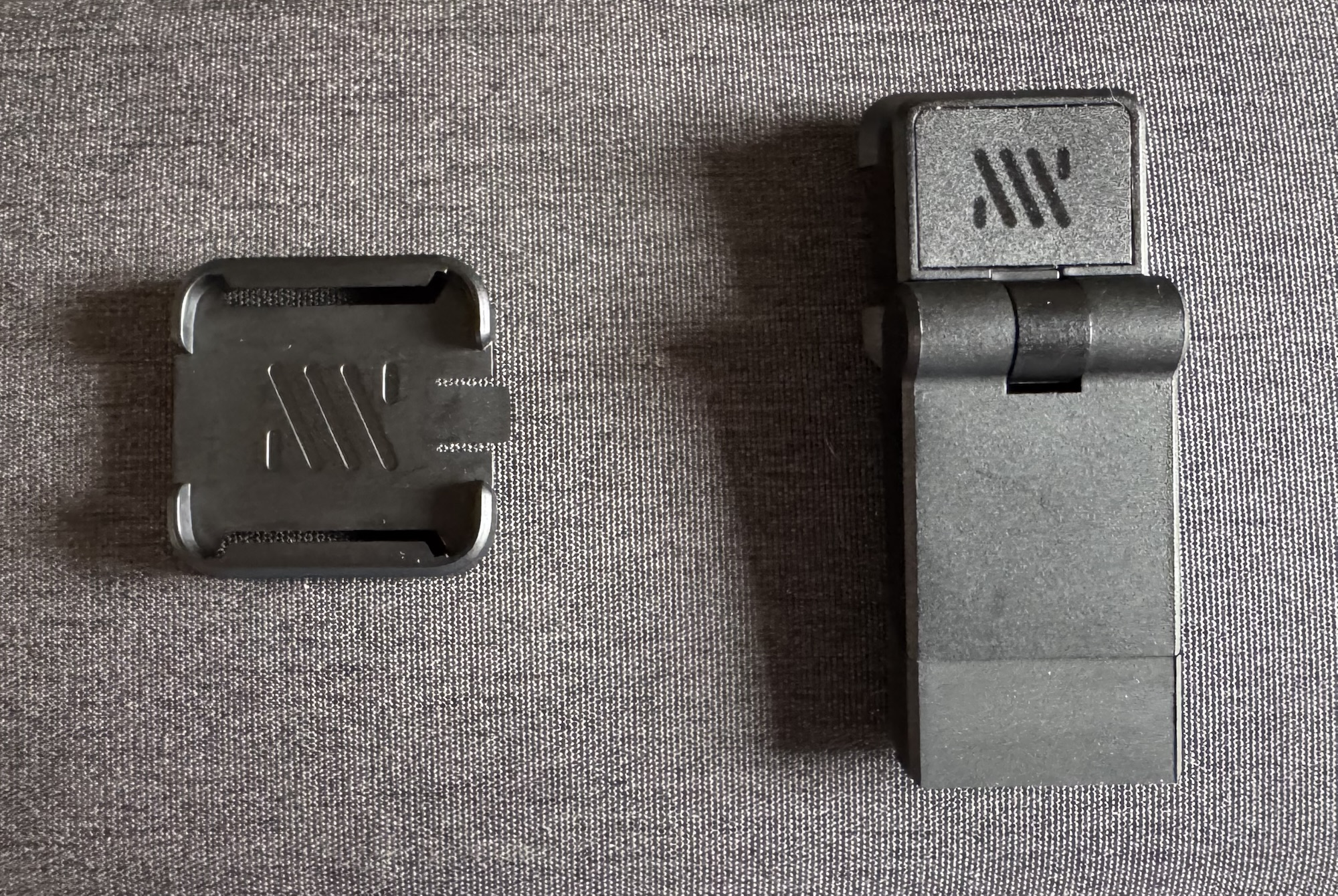
I’ve been using the Mechanism Kickstand 2 along with their JSAUX ModCase adapter for a little while now and it’s quietly become one of my favourite Steam Deck accessory combinations. The kickstand feels great, it’s solid and feels good to adjust without that wobbly, cheap feeling you get from a lot of third-party stands. Mechanism positions the Kickstand 2 as a proper redesign of their original kickstand with a metal hinge for a bit more torque and an over-molded rubber foot so it doesn’t look like that Tech Deck you had as a kid, sliding all over the place. The viewing angles are the biggest positive and you can legitimately put this thing at whatever angle suits what you’re doing. I’ve used this thing propped up for writing, laid back for watching content, angled low for tabletop gaming at my desk and coffee table, you name it. I previously used the metal JSAUX kickstand that comes with the ModCase, it’s not bad, but the angles you can use it at are incredibly limited in comparison. It’s fine if you just want it upright, but Mechanism’s Kickstand 2 opens up way more flexibility which matters more than I expected once I started using it regularly.

Mechanism JSAUX ModCase Adapter
The JSAUX ModCase adapter is probably the unsung hero here because it’s what actually unlocks the possibility of more accessories. Provided you’re already a ModCase user, you can have a look at my rundown on the JSAUX ModCase against other cases here. It neatly slides into the ModCase’s modular expansion rail and it stays there cleanly. Even better, I can leave the adapter attached when I put my Steam Deck back into my JSAUX Carrying Case which means no messing around removing it every time I pack it away. Once it’s on, you’ve got access to the whole Mechanism ecosystem which could send you down a rabbit hole should you head over to their website. You can slap a MagSafe mount on there and run a dual-screen setup for something like Nintendo DS/3DS emulation, toss your phone on there for a guide or just catch up on some YouTube while you’re gaming. It’ll make things a touch heavier, but how ‘bout that multitasking? It’ll work with all of Mechanism’s other mounts and accessories, so you can build your setup however you like. The adapter is simply the gateway to getting you started.

Mechanism Gaming Pillow & Ecosystem
To call out one specific accessory, Mechanism’s Gaming Pillow is the one that really surprised me. I’ll do a proper post on it down the track. The ModCase adapter connects to it like everything else and it works way better than I expected. If you tend to game with your handheld reclined on the couch or in bed, this will save you digging your elbows in and causing numbness in your hands. It’s a seriously comfortable way to prop the Steam Deck up and make it feel hands-free… or uh, elbows free…? I’ve had my eye on it for a while purely out of curiosity, but a friend of mine recommended it and I went ahead and picked one up. It’s stuck around in the rotation ever since. Solid recommendation, G-Unit! That’s kind of the draw of the Mechanism ecosystem though, you buy one adapter and suddenly every accessory they have becomes a solid option rather than a solid maybe.

Build Quality, Pricing and Verdict
For some reason, when I placed my first order with Mechanism I thought their products were all metal. Clearly, I didn’t actually read the product descriptions properly. But on build quality, both the adapter and kickstand are a solid feeling plastic. Specifically, they’re a high impact polycarbonate rather than anything flimsy. Mechanism are also pretty upfront about the fact that they’ll just give you the files to 3D print some of their accessories at home, if you’d rather make your own. I don’t have a 3D printer and I’m not that interested in owning one, but I think that’s a pretty nice touch for a company of this size. Of course, the finish on Mechanism’s retail product has a noticeably cleaner, premium look and feel than your typical 3D printed DIY job. The only issue I’ve really noticed is the occasional bit of creaking while hooked up to the Gaming Pillow, which comes with the territory of being plastic. That’s absolutely not a dealbreaker and it doesn’t affect any actual functions, but it’ll be there if you’re listening for it. At $22 AUD ($15 USD) for the kickstand and $13 AUD ($9 USD) for the adapter, it’s a pretty low buy-in for how much flexibility you can unlock and it’s backed by Mechanism’s lifetime warranty. Feels like a pretty safe bet, rather than a huge gamble on a small brand.
If you want to check out the Kickstand 2, the JSAUX adapter or the rest of the range, head over to the Mechanism website.
If you’re after a case or some other Steam Deck accessories, JSAUX has a solid range. Use my code DADWITHADECK for a small discount.
FAQ
Do I need a JSAUX ModCase to use Mechanism’s accessories?
No. If you’re looking to get started, you’ve got a couple options. For a grip-style setup, you can grab the Deckmate Grip (this also comes free with a Gaming Pillow). If you prefer a more custom setup, you could look at the Universal Grip.
Is the Mechanism Kickstand 2 worth it over the JSAUX ModCase Kickstand?
Yes. For me, anyway. The stock JSAUX kickstand is fine if you’re just looking to prop it upright. The Kickstand 2 offers a lot more flexibility and viewing angles for not a whole lot of money.
Does the Steam Deck fit in the JSAUX Carrying Case with the JSAUX ModCase Adapter attached?
Yes. I leave my adapter attached, it fits fine with maybe a little bit of bending to the material under the Steam Deck.
Does the Steam Deck fit in the original Valve Carrying Case with the JSAUX ModCase Adapter attached?
Yes. I tested the adapter with my original Valve Carrying Case and it fits perfectly. I also have stick caps on, so you’ve got plenty of space.
Lifetime warranty? You’re shittin’ me, right?
No. Mechanism stands by their products. They back themselves. If you run into issues, get in touch and they’ll mail you a replacement part if there is a genuine issue.




Leave a Reply